Paper Planner or Shared Digital Calendar?
Choose a paper planner or shared digital calendar by comparing visibility, coordination and plan changes, so commitments stay clear to everyone involved.
The common mistake in choosing a paper planner or shared digital calendar is picking the format that looks most satisfying, then asking it to solve a problem it cannot see. A beautifully laid-out notebook cannot alert another person to a changed meeting; a shared calendar cannot help much if nobody opens it. Choose around how commitments become visible, who needs to coordinate them and how often plans move.
What the format changes
A calendar is not just a place to store appointments. It is a way of making time legible: to you, to other people, or to both. The best format fits the moment when you need to notice a commitment and the people who must act on it.
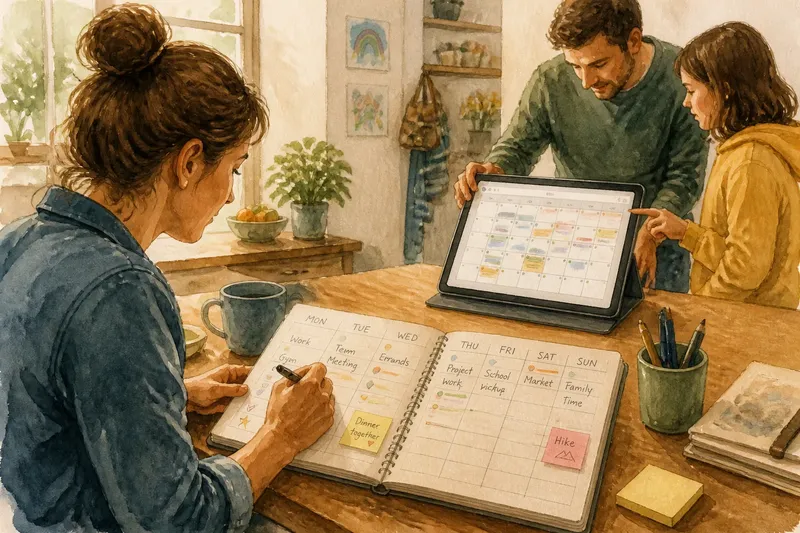
A paper planner puts the week on a page you can see without unlocking a device. A shared digital calendar makes entries available to selected people and can update their view when a plan changes. A hybrid approach uses each for a distinct job, rather than copying every entry in two places.
These are not competing claims about which tool is better. They are different arrangements for attention and coordination. A solo routine may need a clear view of the week; a household or team may need a common record that changes can reach.
Paper planner visibility
Paper works well when seeing several days at once helps you judge the shape of the week. A weekly spread can show work shifts, regular errands and open time together. That broad view makes collisions easier to spot before you agree to another commitment.
It also keeps planning tactile and self-contained. You can jot a note beside an appointment, draw a line to connect related tasks or mark a recurring ritual with the same small symbol. The page stays available without notifications, account access or a device battery.
That visibility has a boundary: it belongs to whoever can see the page. If a partner, colleague or carer also needs to know about an appointment, a notebook on your desk does not make that information shared. You must tell them separately or use another common record.
Paper is a sensible fit if you mainly manage your own commitments, prefer a full-page view, and have a stable place to keep the planner open or easy to reach. It may also suit a person who finds screen alerts distracting but still wants a deliberate daily glance at the week.
Shared calendar coordination
A shared digital calendar is useful when several people need the same current information. A household might use it for school events, travel plans and the person responsible for collecting a parcel. A small team might use a common calendar for meetings and leave periods, while keeping private details out of view.
Its chief advantage is not that every entry becomes effortless. It is that an authorised change can appear in the same shared record, rather than relying on a chain of messages and memory. Invitations, notifications and calendar views can help people notice updates, though each person still needs to check the settings and use the system.
Sharing also requires choices about access. Decide who can see an event, who can edit it and whether an entry needs a title that reveals sensitive information. For example, “appointment” may be enough for a shared household view where a detailed medical label would be unnecessary.
Digital sharing suits people whose plans regularly affect one another, especially when they are not in the same place at the same time. It is less useful if some participants do not have reliable access to the chosen service or are unlikely to check it. In that case, a short direct message may still be needed for important changes.
When plans move
Changing plans is where the difference becomes plain. In a paper planner, you cross out or amend the original entry and write the new one. This is simple, private and easy to understand, but anyone relying on a separate copy will not see the change unless you tell them.
In a shared digital calendar, you edit the event in the common record. Depending on the service and each person’s settings, participants may receive an update. The practical benefit is a single place to check, not an assumption that every alert will be seen.
Paper can be easier when changes are occasional and you are the only person affected. Digital can be easier when changes affect several people and need to reach them quickly. If you often move plans, avoid treating a paper page and a digital calendar as equal authorities; decide which one is the source of truth.
Say you keep a paper planner for work and share family commitments with a partner. If a shift changes and affects a planned collection, you could amend your own page and update the shared event as the authoritative family record. The expected observable result is that your planner reflects your work week while your partner can check the collection arrangement in the common calendar.
Which calendar fits?
Is a paper planner good for a busy week?
It can be, if a single weekly view helps you see how work, errands and recurring commitments fit together. Choose a layout with enough room for the details you actually need, rather than one that invites decoration but leaves appointments cramped.
Can a shared calendar replace a planner?
It can replace one if you already check the digital view and it presents your week clearly. If you rely on writing to think through priorities, keep a brief paper planning page for that purpose and let the shared calendar remain the authority for joint appointments.
How should a household share calendar access?
Start with the people who need to coordinate, then give each person the least access that still lets them do their part. Use clear event names, agree what belongs in the shared calendar and keep personal details out unless everyone concerned wants them included.
What should happen when an event changes?
Choose one place where the current time and arrangement will be kept, then update that record as soon as the change is agreed. If somebody may not check it in time, contact them directly rather than relying on a notification alone.
A useful hybrid
Hybrid planning can work when each format has a separate role. For instance, use a shared digital calendar for appointments involving other people, and a paper planner for your own daily priorities and notes. This avoids expecting a private notebook to coordinate a group or asking a calendar to serve as a reflective work surface.
Do not duplicate every entry by habit. Two complete calendars create a small clerical job: each change must be copied, and a missed edit leaves conflicting versions. If you write a shared appointment in your planner, treat it as a personal reminder and check the digital source before acting on a later change.
Nor is it worth spending hours choosing colours, icons or elaborate planner accessories before deciding what must be visible and to whom. A plain weekly spread or a few clearly named digital calendars is enough to reveal whether the format fits your routine.
Make the choice
Write down the commitments you most need to keep track of, then ask three questions: who needs to see each one, how often does it change, and when do you need to notice it? If most answers point to you and a stable weekly view, paper may be the cleaner choice. If they point to several people and changing arrangements, a shared digital calendar is likely to serve better.
Choose the smallest system that covers those needs. Set up only the calendars or planner sections you will actually consult, agree how updates are handled, and keep the source of truth obvious. A paper planner or shared digital calendar earns its place by making the next commitment easy to see, and by making a changed plan clear to the people who need to know.